<!DOCTYPE html>
    <html lang="vi" xmlns="http://www.w3.org/1999/xhtml" prefix="og: http://ogp.me/ns#">
    <head>
<title>5 phương pháp giúp tản nhiệt cho laptop hiệu quả nhất</title>
<meta name="description" content="5 phương pháp giúp tản nhiệt cho laptop hiệu quả nhất - Savefile - VDC News">
<meta name="author" content="SỬA MACBOOK SỬA CHỮA MACBOOK IMAC MAC PRO CHỮA LAPTOP HÀ NỘI">
<meta name="copyright" content="SỬA MACBOOK SỬA CHỮA MACBOOK IMAC MAC PRO CHỮA LAPTOP HÀ NỘI [ceo@suachuamaytinh.vn]">
<meta name="robots" content="index, archive, follow, noodp">
<meta name="googlebot" content="index,archive,follow,noodp">
<meta name="msnbot" content="all,index,follow">
<meta name="generator" content="NukeViet v4.4">
<meta http-equiv="Content-Type" content="text/html; charset=utf-8">
<meta property="og:title" content="5 phương pháp giúp tản nhiệt cho laptop hiệu quả nhất">
<meta property="og:type" content="website">
<meta property="og:description" content="Savefile - VDC News">
<meta property="og:site_name" content="SỬA MACBOOK SỬA CHỮA MACBOOK IMAC MAC PRO CHỮA LAPTOP HÀ NỘI">
<link rel="shortcut icon" href="https://suachuamaytinh.vn/favicon.ico">
<link rel="canonical" href="https://suachuamaytinh.vn/Kien-thuc-tin-hoc/5-phuong-phap-giup-tan-nhiet-cho-laptop-hieu-qua-nhat-1469.html">
<link rel="alternate" href="https://suachuamaytinh.vn/rss/" title="VDC News" type="application/rss+xml">
<link rel="alternate" href="https://suachuamaytinh.vn/rss/APPLE-HA-NOI/" title="VDC News - APPLE HÀ NỘI" type="application/rss+xml">
<link rel="alternate" href="https://suachuamaytinh.vn/rss/DICH-VU-SUA-CHUA-MACBOOK-IMAC-IPHONE-IPAD/" title="VDC News - DỊCH VỤ SỬA CHỮA MACBOOK IMAC IPHONE IPAD" type="application/rss+xml">
<link rel="alternate" href="https://suachuamaytinh.vn/rss/TU-VAN-KY-THUAT-CHIA-SE-KINH-NGHIEM-HUONG-DAN-APPLE-MACBOOK-IMAC-IPHONE-IPAD/" title="VDC News - TƯ VẤN KỸ THUẬT CHIA SẺ KINH NGHIỆM HƯỚNG DẪN APPLE MACBOOK IMAC IPHONE IPAD" type="application/rss+xml">
<link rel="alternate" href="https://suachuamaytinh.vn/rss/Dich-vu-sua-chua-va-ky-thuat/" title="VDC News - Dịch vụ sửa chữa" type="application/rss+xml">
<link rel="alternate" href="https://suachuamaytinh.vn/rss/Chuyen-Nghiep/" title="VDC News - Chuyên Nghiệp" type="application/rss+xml">
<link rel="alternate" href="https://suachuamaytinh.vn/rss/Phan-cung-chuyen-sau/" title="VDC News - Phần cứng chuyên sâu" type="application/rss+xml">
<link rel="alternate" href="https://suachuamaytinh.vn/rss/Laptop-may-tinh-xach-tay/" title="VDC News - Laptop máy tính xách tay" type="application/rss+xml">
<link rel="alternate" href="https://suachuamaytinh.vn/rss/Mainboard-bo-mach-chu/" title="VDC News - Mainboard bo mạch chủ" type="application/rss+xml">
<link rel="alternate" href="https://suachuamaytinh.vn/rss/CPU-bo-vi-su-ly/" title="VDC News - CPU bộ vi sử lý" type="application/rss+xml">
<link rel="alternate" href="https://suachuamaytinh.vn/rss/Dien-tu-co-ban/" title="VDC News - Điện tử cơ bản" type="application/rss+xml">
<link rel="alternate" href="https://suachuamaytinh.vn/rss/Nguon-ATX-PSU-power-supply/" title="VDC News - Nguồn ATX - PSU - power supply" type="application/rss+xml">
<link rel="alternate" href="https://suachuamaytinh.vn/rss/Moniter-man-hinh-may-tinh/" title="VDC News - Moniter màn hình máy tính" type="application/rss+xml">
<link rel="alternate" href="https://suachuamaytinh.vn/rss/USB-MP3-MP4/" title="VDC News - USB-MP3-MP4" type="application/rss+xml">
<link rel="alternate" href="https://suachuamaytinh.vn/rss/Kien-thuc-tin-hoc/" title="VDC News - Kiến thức tin học" type="application/rss+xml">
<link rel="alternate" href="https://suachuamaytinh.vn/rss/Thu-thuat-may-tinh/" title="VDC News - Thủ thuật máy tính " type="application/rss+xml">
<link rel="alternate" href="https://suachuamaytinh.vn/rss/Thu-thuat-van-phong/" title="VDC News - Thủ thuật văn phòng " type="application/rss+xml">
<link rel="alternate" href="https://suachuamaytinh.vn/rss/MS-PowerPoint/" title="VDC News - MS PowerPoint" type="application/rss+xml">
<link rel="alternate" href="https://suachuamaytinh.vn/rss/MS-Word/" title="VDC News - MS Word" type="application/rss+xml">
<link rel="alternate" href="https://suachuamaytinh.vn/rss/MS-Excel/" title="VDC News - MS Excel" type="application/rss+xml">
<link rel="alternate" href="https://suachuamaytinh.vn/rss/Cach-diet-virus/" title="VDC News - Cách diệt virus " type="application/rss+xml">
<link rel="alternate" href="https://suachuamaytinh.vn/rss/Cong-cu-diet-Virus/" title="VDC News - Công cụ diệt Virus " type="application/rss+xml">
<link rel="alternate" href="https://suachuamaytinh.vn/rss/Bao-mat-virus/" title="VDC News - Bảo mật, virus " type="application/rss+xml">
<link rel="alternate" href="https://suachuamaytinh.vn/rss/Huong-dan-su-dung-phan-mem/" title="VDC News - Hướng dẫn sử dụng phần mềm" type="application/rss+xml">
<link rel="alternate" href="https://suachuamaytinh.vn/rss/Tin-Tuc-Cong-Nghe-Thong-Tin/" title="VDC News - Tin Tức Công Nghệ Thông Tin" type="application/rss+xml">
<link rel="alternate" href="https://suachuamaytinh.vn/rss/Vien-thong/" title="VDC News - Viễn thông" type="application/rss+xml">
<link rel="alternate" href="https://suachuamaytinh.vn/rss/Tien-Ich/" title="VDC News - Tiện Ích" type="application/rss+xml">
<link rel="alternate" href="https://suachuamaytinh.vn/rss/Khoa-hoc-may-tinh/" title="VDC News - Khoa học máy tính" type="application/rss+xml">
<link rel="alternate" href="https://suachuamaytinh.vn/rss/Lap-trinh/" title="VDC News - Lập trình" type="application/rss+xml">
<link rel="alternate" href="https://suachuamaytinh.vn/rss/Do-hoa-vi-tinh/" title="VDC News - Đồ họa vi tính" type="application/rss+xml">
<link rel="alternate" href="https://suachuamaytinh.vn/rss/He-Dieu-Hanh/" title="VDC News - Hệ Điều Hành" type="application/rss+xml">
<link rel="alternate" href="https://suachuamaytinh.vn/rss/Thu-thuat-seo/" title="VDC News - Thủ thuật seo" type="application/rss+xml">
<link rel="alternate" href="https://suachuamaytinh.vn/rss/Review-san-pham/" title="VDC News - Review sản phẩm" type="application/rss+xml">
<link rel="alternate" href="https://suachuamaytinh.vn/rss/Nguon-may-tinh-power-supply/" title="VDC News - Nguồn máy tính power supply" type="application/rss+xml">
<link rel="alternate" href="https://suachuamaytinh.vn/rss/Man-hinh-Moniter/" title="VDC News - Màn hình Moniter" type="application/rss+xml">
<link rel="alternate" href="https://suachuamaytinh.vn/rss/Chuot-may-tinh-mouse/" title="VDC News - Chuột máy tính mouse" type="application/rss+xml">
<link rel="alternate" href="https://suachuamaytinh.vn/rss/CARD-man-hinh-VGA/" title="VDC News - CARD màn hình VGA" type="application/rss+xml">
<link rel="alternate" href="https://suachuamaytinh.vn/rss/Bo-mach-chu-MAINBOARD/" title="VDC News - Bo mạch chủ MAINBOARD" type="application/rss+xml">
<link rel="alternate" href="https://suachuamaytinh.vn/rss/Linh-tinh/" title="VDC News - Linh tinh" type="application/rss+xml">
<link rel="alternate" href="https://suachuamaytinh.vn/rss/O-cung-Hard-disk-drive/" title="VDC News - Ổ cứng - Hard disk drive" type="application/rss+xml">
<link rel="alternate" href="https://suachuamaytinh.vn/rss/Vo-may-tinh-CASE/" title="VDC News - Vỏ máy tính - CASE" type="application/rss+xml">
<link rel="alternate" href="https://suachuamaytinh.vn/rss/Bo-tan-nhiet/" title="VDC News - Bộ tản nhiệt" type="application/rss+xml">
<link rel="alternate" href="https://suachuamaytinh.vn/rss/Mang-khong-day-ROUTER-WIRELESS/" title="VDC News - Mạng không dây - ROUTER WIRELESS" type="application/rss+xml">
<link rel="alternate" href="https://suachuamaytinh.vn/rss/May-tinh-xach-tay-LAPTOP/" title="VDC News - Máy tính xách tay - LAPTOP" type="application/rss+xml">
<link rel="alternate" href="https://suachuamaytinh.vn/rss/Ram-bo-nho-trong/" title="VDC News - Ram - bộ nhớ trong" type="application/rss+xml">
<link rel="alternate" href="https://suachuamaytinh.vn/rss/CPU-bo-vi-xu-ly/" title="VDC News - CPU bộ vi xử lý" type="application/rss+xml">
<link rel="alternate" href="https://suachuamaytinh.vn/rss/May-tinh-bang/" title="VDC News - Máy tính bảng" type="application/rss+xml">
<link rel="alternate" href="https://suachuamaytinh.vn/rss/Kien-thuc-su-dung-Laptop-dung-cach/" title="VDC News - Kiến thức sử dụng Laptop đúng cách" type="application/rss+xml">
<link rel="alternate" href="https://suachuamaytinh.vn/rss/Huong-dan-su-dung/" title="VDC News - Hướng  dẫn sử dụng" type="application/rss+xml">
<link rel="alternate" href="https://suachuamaytinh.vn/rss/Thu-thuat-kinh-nghiem/" title="VDC News - Thủ thuật kinh nghiệm" type="application/rss+xml">
<link rel="alternate" href="https://suachuamaytinh.vn/rss/Tu-van-chon-laptop/" title="VDC News - Tư vấn chọn laptop" type="application/rss+xml">
<link rel="alternate" href="https://suachuamaytinh.vn/rss/Thong-tin-khoa-hoc/" title="VDC News - Thông tin khoa học" type="application/rss+xml">
<link rel="alternate" href="https://suachuamaytinh.vn/rss/Khoa-hoc-vu-tru/" title="VDC News - Khoa học vũ trụ" type="application/rss+xml">
<link rel="alternate" href="https://suachuamaytinh.vn/rss/Phat-minh-khoa-hoc/" title="VDC News - Phát minh khoa học" type="application/rss+xml">
<link rel="alternate" href="https://suachuamaytinh.vn/rss/Cong-trinh-khoa-hoc/" title="VDC News - Công trình khoa học" type="application/rss+xml">
<link rel="alternate" href="https://suachuamaytinh.vn/rss/Cong-nghe-moi/" title="VDC News - Công nghệ mới" type="application/rss+xml">
<link rel="alternate" href="https://suachuamaytinh.vn/rss/Suy-Ngam/" title="VDC News - Suy Ngẫm" type="application/rss+xml">
<link rel="alternate" href="https://suachuamaytinh.vn/rss/Thu-gian/" title="VDC News - Thư giãn" type="application/rss+xml">
<link rel="alternate" href="https://suachuamaytinh.vn/rss/The-gioi/" title="VDC News - Thế giới" type="application/rss+xml">
<link rel="alternate" href="https://suachuamaytinh.vn/rss/Phan-tich/" title="VDC News - Phân tích" type="application/rss+xml">
<link rel="preload" as="script" href="https://suachuamaytinh.vn/assets/js/jquery/jquery.min.js">
<link rel="preload" as="script" href="https://suachuamaytinh.vn/assets/js/language/vi.js">
<link rel="preload" as="script" href="https://suachuamaytinh.vn/assets/js/DOMPurify/purify.js">
<link rel="preload" as="script" href="https://suachuamaytinh.vn/assets/js/global.js">
<link rel="preload" as="script" href="https://suachuamaytinh.vn/assets/js/site.js">
<link rel="preload" as="script" href="https://suachuamaytinh.vn/themes/default/js/news.js">
<link rel="preload" as="script" href="https://suachuamaytinh.vn/themes/default/js/main.js">
<link rel="preload" as="script" href="https://suachuamaytinh.vn/themes/default/js/custom.js">
<link rel="preload" as="script" href="https://suachuamaytinh.vn/themes/default/js/bootstrap.min.js">
<link rel="stylesheet" href="https://suachuamaytinh.vn/assets/css/font-awesome.min.css">
<link rel="stylesheet" href="https://suachuamaytinh.vn/themes/default/css/bootstrap.non-responsive.css">
<link rel="stylesheet" href="https://suachuamaytinh.vn/themes/default/css/style.css">
<link rel="stylesheet" href="https://suachuamaytinh.vn/themes/default/css/style.non-responsive.css">
<link rel="StyleSheet" href="https://suachuamaytinh.vn/themes/default/css/news.css">
<link rel="stylesheet" href="https://suachuamaytinh.vn/themes/default/css/custom.css">
<style type="text/css">
	body{background: #fff;}
</style>
    </head>
    <body>
<div id="print">
	<div id="hd_print">
		<h2 class="pull-left">SỬA MACBOOK SỬA CHỮA MACBOOK IMAC MAC PRO CHỮA LAPTOP HÀ NỘI</h2>
		<p class="pull-right"><a title="SỬA MACBOOK SỬA CHỮA MACBOOK IMAC MAC PRO CHỮA LAPTOP HÀ NỘI" href="https://suachuamaytinh.vn/">https://suachuamaytinh.vn</a></p>
	</div>
	<div class="clear"></div>
	<hr />
	<div id="content">
		<h1>5 phương pháp giúp tản nhiệt cho laptop hiệu quả nhất</h1>
		<ul class="list-inline">
			<li>Thứ tư - 19/08/2015 07:05</li>
			<li class="hidden-print txtrequired"><em class="fa fa-print">&nbsp;</em><a title="In ra" href="javascript:;" onclick="window.print()">In ra</a></li>
			<li class="hidden-print txtrequired"><em class="fa fa-power-off">&nbsp;</em><a title="Đóng cửa sổ này" href="javascript:;" onclick="window.close()">Đóng cửa sổ này</a></li>
		</ul>
		<div class="clear"></div>
		<div id="hometext">
						<div class="pull-left imghome">
				<img alt="suachuamaytinh.vn" src="https://suachuamaytinh.vn/assets/news/2015_08/youre-done-laptop_1.jpg" width="100" class="img-thumbnail" />
								<p>
					<em>suachuamaytinh.vn</em>
				</p>
			</div>
			Ngày nay khi mà bất cứ ai cũng đều có khả năng sở hữu một chiếc laptop. Dù mới mua hay sử dụng lâu rồi thì Laptop vẫn luôn tỏa ra một lượng nhiệt lượng nhất định. Vấn đề này gây ra khá nhiều lo lắng cho người dùng. Chính vì vậy vấn đề tản nhiệt khá quan trọng khi sử dụng Laptop. Nhưng với thời lượng sử dụng laptop càng lâu thì thiết bị sẽ tỏa ra nhiệt độ càng nhiều làm ảnh hưởng đến tuổi thọ của laptop hoặc có thể làm hư hỏng chất liệu nơi mà bạn đặt laptop lên.
		</div>
		<div id="bodytext" class="clearfix">
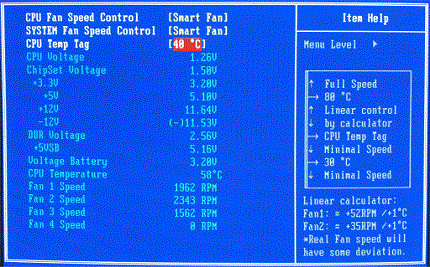
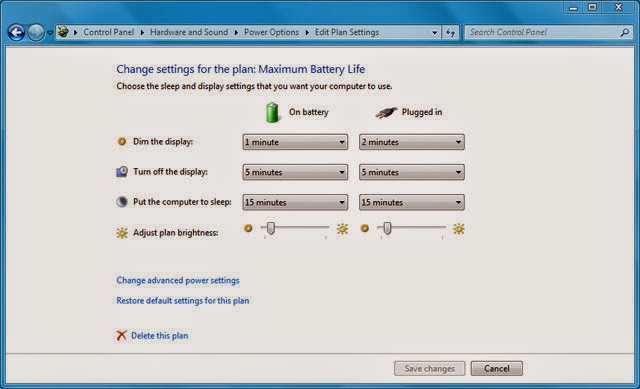
			<br  /><br  /><br  /><span style="font-size:14px;"><strong>Hiểu được những lo lắng của khách hàng, suachuamaytinh.vn sẽ chia sẻ với các bạn 5 phương pháp giúp <a href="http://suachuamaytinh.vn/">tản nhiệt cho laptop</a> hiệu quả.</strong></span><br style="color: rgb(66, 69, 71); font-family: Geneva, sans-serif; font-size: 14px; line-height: 23.7999992370605px;" /><b style="color: rgb(66, 69, 71); font-family: Geneva, sans-serif; font-size: 14px; line-height: 23.7999992370605px;">CÁCH 1 : Bạn hãy chủ động khắc phục nguy cơ tăng nhiệt laptop</b><br style="color: rgb(66, 69, 71); font-family: Geneva, sans-serif; font-size: 14px; line-height: 23.7999992370605px;" /><div class="separator" style="color: rgb(66, 69, 71); font-family: Geneva, sans-serif; font-size: 14px; line-height: 23.7999992370605px; clear: both; text-align: center;"> <a href="http://suachuamaytinh.vn/" imageanchor="1" style="text-decoration: none; color: rgb(0, 77, 153); margin-left: 1em; margin-right: 1em;"><img alt="" src="https://suachuamaytinh.vn/uploads/news/2015_08/youre-done-laptop_1.jpg" style="width: 400px; height: 267px;" /></a></div><br style="color: rgb(66, 69, 71); font-family: Geneva, sans-serif; font-size: 14px; line-height: 23.7999992370605px;" /><span style="color: rgb(66, 69, 71); font-family: Geneva, sans-serif; font-size: 14px; line-height: 23.7999992370605px;">Khi chọn mua laptop hãy chọn các laptop có hệ thống tản nhiệt hiệu quả, thuận tiện. Ngoài ra, cần lưu ý một số điểm sau:</span><br style="color: rgb(66, 69, 71); font-family: Geneva, sans-serif; font-size: 14px; line-height: 23.7999992370605px;" /><br style="color: rgb(66, 69, 71); font-family: Geneva, sans-serif; font-size: 14px; line-height: 23.7999992370605px;" /><span style="color: rgb(66, 69, 71); font-family: Geneva, sans-serif; font-size: 14px; line-height: 23.7999992370605px;">-Hệ thống tản nhiệt phải không phả hơi nóng vào phía tay di chuột.</span><br style="color: rgb(66, 69, 71); font-family: Geneva, sans-serif; font-size: 14px; line-height: 23.7999992370605px;" /><br style="color: rgb(66, 69, 71); font-family: Geneva, sans-serif; font-size: 14px; line-height: 23.7999992370605px;" /><span style="color: rgb(66, 69, 71); font-family: Geneva, sans-serif; font-size: 14px; line-height: 23.7999992370605px;">- Không bố trí hệ thống tản nhiệt ngay sát pin, vì nhiệt độ sẽ nhanh chóng làm giảm tuổi thọ pin.</span><br style="color: rgb(66, 69, 71); font-family: Geneva, sans-serif; font-size: 14px; line-height: 23.7999992370605px;" /><br style="color: rgb(66, 69, 71); font-family: Geneva, sans-serif; font-size: 14px; line-height: 23.7999992370605px;" /><span style="color: rgb(66, 69, 71); font-family: Geneva, sans-serif; font-size: 14px; line-height: 23.7999992370605px;">- Hệ thống tản nhiệt hoạt động theo mức xung nhịp CPU và hoạt động êm ái, ngay cả trong điều kiện CPU/GPU hoạt động ở xung nhịp tối đa như xem phim HD, biên tập video, chơi game, xử lý đồ họa 3D,…</span><br style="color: rgb(66, 69, 71); font-family: Geneva, sans-serif; font-size: 14px; line-height: 23.7999992370605px;" /><br style="color: rgb(66, 69, 71); font-family: Geneva, sans-serif; font-size: 14px; line-height: 23.7999992370605px;" /><span style="color: rgb(66, 69, 71); font-family: Geneva, sans-serif; font-size: 14px; line-height: 23.7999992370605px;">Nếu đã mua laptop rồi thì vẫn có một cách đơn giản mà hiệu quả, đó là để kê cao mặt dưới máy tính lên, có thể dùng giá đỡ hoặc đơn giản là kê một cuốn sách như hình minh họa vào phần sau, để cho bề mặt dưới laptop được thông thoáng, giúp tản nhiệt hệ thống tốt hơn.</span><br style="color: rgb(66, 69, 71); font-family: Geneva, sans-serif; font-size: 14px; line-height: 23.7999992370605px;" /><br style="color: rgb(66, 69, 71); font-family: Geneva, sans-serif; font-size: 14px; line-height: 23.7999992370605px;" /><span style="color: rgb(66, 69, 71); font-family: Geneva, sans-serif; font-size: 14px; line-height: 23.7999992370605px;">Tuy nhiên, không phải lúc nào cách này cũng hiệu quả, vì nó còn phụ thuộc vào hệ thống tản nhiệt sẵn có của máy.</span><br style="color: rgb(66, 69, 71); font-family: Geneva, sans-serif; font-size: 14px; line-height: 23.7999992370605px;" /><br style="color: rgb(66, 69, 71); font-family: Geneva, sans-serif; font-size: 14px; line-height: 23.7999992370605px;" /><b style="color: rgb(66, 69, 71); font-family: Geneva, sans-serif; font-size: 14px; line-height: 23.7999992370605px;">Cách 2: Bạn có thể giảm nhiệt độ laptop bằng đế tản nhiệt</b><br style="color: rgb(66, 69, 71); font-family: Geneva, sans-serif; font-size: 14px; line-height: 23.7999992370605px;" /><div class="separator" style="color: rgb(66, 69, 71); font-family: Geneva, sans-serif; font-size: 14px; line-height: 23.7999992370605px; clear: both; text-align: center;"> <a href="http://suachuamaytinh.vn/" imageanchor="1" style="text-decoration: none; color: rgb(0, 77, 153); margin-left: 1em; margin-right: 1em;"><img alt="" src="https://suachuamaytinh.vn/uploads/news/2015_08/201209102936_de_tan_nhiet_bjb_828_1.jpg" style="width: 400px; height: 300px;" /></a></div><br style="color: rgb(66, 69, 71); font-family: Geneva, sans-serif; font-size: 14px; line-height: 23.7999992370605px;" /><span style="color: rgb(66, 69, 71); font-family: Geneva, sans-serif; font-size: 14px; line-height: 23.7999992370605px;">Hiện nay trên thị trường có rất nhiều loại đế tản nhiệt cho laptop, với nhiều mẫu mã và giá cả khác nhau. Khi mua sắm đế tản nhiệt rời cần chú ý đến tính hiệu quả và thực dụng cho laptop của bạn với một số lưu ý sau:</span><br style="color: rgb(66, 69, 71); font-family: Geneva, sans-serif; font-size: 14px; line-height: 23.7999992370605px;" /><br style="color: rgb(66, 69, 71); font-family: Geneva, sans-serif; font-size: 14px; line-height: 23.7999992370605px;" /><span style="color: rgb(66, 69, 71); font-family: Geneva, sans-serif; font-size: 14px; line-height: 23.7999992370605px;">Hệ thống quạt tản nhiệt ở đế phải có khả năng hút nhiệt từ laptop ra, nghĩa là hướng gió ngược ra ngoài chứ không phải là thổi vào trong laptop</span><br style="color: rgb(66, 69, 71); font-family: Geneva, sans-serif; font-size: 14px; line-height: 23.7999992370605px;" /><br style="color: rgb(66, 69, 71); font-family: Geneva, sans-serif; font-size: 14px; line-height: 23.7999992370605px;" /><span style="color: rgb(66, 69, 71); font-family: Geneva, sans-serif; font-size: 14px; line-height: 23.7999992370605px;">Ở trên mặt đỡ laptop phải có gờ để tránh bị trượt laptop khi sử dụng, vì phần lớn đế tản nhiệt có mặt nghiêng và bề mặt nhẵn trơn.</span><br style="color: rgb(66, 69, 71); font-family: Geneva, sans-serif; font-size: 14px; line-height: 23.7999992370605px;" /><br style="color: rgb(66, 69, 71); font-family: Geneva, sans-serif; font-size: 14px; line-height: 23.7999992370605px;" /><span style="color: rgb(66, 69, 71); font-family: Geneva, sans-serif; font-size: 14px; line-height: 23.7999992370605px;">Đừng tin lời nhà sản xuất về các công nghệ tích hợp trên đế tản nhiệt! Bạn phải trực tiếp trải nghiệm và chọn cho mình thiết bị phù hợp và tản nhiệt hiệu quả.</span><br  /><br  /><span style="color: rgb(20, 20, 20); font-family: Tahoma, Geneva, sans-serif; font-size: 14.6666669845581px; line-height: 24px; text-align: justify;">Nếu bạn sở hữu một chiếc Ultrabook thì không nhất thiết phải chọn chiếc đề hoàn toàn bằng nhôm</span><span style="color: rgb(20, 20, 20); font-family: Tahoma, Geneva, sans-serif; font-size: 14.6666669845581px; line-height: 24px; text-align: justify;">. Chất liệu nhựa</span><span style="color: rgb(20, 20, 20); font-family: Tahoma, Geneva, sans-serif; font-size: 14.6666669845581px; line-height: 24px; text-align: justify;">&nbsp;cứng cáp cũng đã đủ để nâng đỡ chiếc<br  /><br  />Ultrabook của bạn rồi. Khi chọn những chiếc đế bằng nhựa bạn nên tránh những loại mỏng, ọp ẹp. Nếu như Laptop của bạn nặng trên 2kg thì bạn nên quên<br  /><br  />nhựa đi, chúng không đủ chắc chắn đâu. Hơn nữa nhôm cũng giúp tản nhiệt nhanh hơn nhựa</span><br style="color: rgb(66, 69, 71); font-family: Geneva, sans-serif; font-size: 14px; line-height: 23.7999992370605px;" /><br style="color: rgb(66, 69, 71); font-family: Geneva, sans-serif; font-size: 14px; line-height: 23.7999992370605px;" /><span style="color: rgb(66, 69, 71); font-family: Geneva, sans-serif; font-size: 14px; line-height: 23.7999992370605px;">Ưu điểm: Dễ thực hiện vì có sẵn giải pháp, tản nhiệt ngoài nên không ảnh hưởng nhiều đến hiệu năng hệ thống.</span><br style="color: rgb(66, 69, 71); font-family: Geneva, sans-serif; font-size: 14px; line-height: 23.7999992370605px;" /><br style="color: rgb(66, 69, 71); font-family: Geneva, sans-serif; font-size: 14px; line-height: 23.7999992370605px;" /><span style="color: rgb(66, 69, 71); font-family: Geneva, sans-serif; font-size: 14px; line-height: 23.7999992370605px;">Nhược điểm: Khá cồng kềnh và bất tiện khi di chuyển, phải mất thêm chi phí sắm đế tản nhiệt. Ngoài ra phải sử dụng nguồn (qua cổng USB) nên sẽ ảnh hưởng tới thời gian dùng pin cho laptop khi không cắm sạc.</span><br style="color: rgb(66, 69, 71); font-family: Geneva, sans-serif; font-size: 14px; line-height: 23.7999992370605px;" /><br style="color: rgb(66, 69, 71); font-family: Geneva, sans-serif; font-size: 14px; line-height: 23.7999992370605px;" /><b style="color: rgb(66, 69, 71); font-family: Geneva, sans-serif; font-size: 14px; line-height: 23.7999992370605px;">Cách 3: Bạn có thể tự chế quạt tản nhiệt</b><br style="color: rgb(66, 69, 71); font-family: Geneva, sans-serif; font-size: 14px; line-height: 23.7999992370605px;" /><div class="separator" style="color: rgb(66, 69, 71); font-family: Geneva, sans-serif; font-size: 14px; line-height: 23.7999992370605px; clear: both; text-align: center;"> <a href="http://suachuamaytinh.vn/" imageanchor="1" style="text-decoration: none; color: rgb(0, 77, 153); margin-left: 1em; margin-right: 1em;"><img alt="" src="https://suachuamaytinh.vn/uploads/news/2015_08/tan-nhiet_1.jpg" style="width: 400px; height: 278px;" /></a></div><br style="color: rgb(66, 69, 71); font-family: Geneva, sans-serif; font-size: 14px; line-height: 23.7999992370605px;" /><span style="color: rgb(66, 69, 71); font-family: Geneva, sans-serif; font-size: 14px; line-height: 23.7999992370605px;">Gần đây trên các diễn đàn công nghệ, có một số bạn đã sáng tạo ra nhiều cách tản nhiệt cho <a href="http://suachuamaytinh.vn/">laptop</a>, nhưng yêu cầu chung là bạn phải có trải nghiệm nhất định và chịu khó tìm tòi để có giải pháp tản nhiệt tối ưu cho riêng mình. Ngoài ra, phải nhớ nguyên tắc tản nhiệt cho laptop là “hút khí từ trong ra ngoài” chứ không phải làm ngược lại.</span><br style="color: rgb(66, 69, 71); font-family: Geneva, sans-serif; font-size: 14px; line-height: 23.7999992370605px;" /><br style="color: rgb(66, 69, 71); font-family: Geneva, sans-serif; font-size: 14px; line-height: 23.7999992370605px;" /><span style="color: rgb(66, 69, 71); font-family: Geneva, sans-serif; font-size: 14px; line-height: 23.7999992370605px;">Ưu điểm: Hiệu quả tản nhiện tốt hơn giải pháp sử dụng đế tản nhiệt có bán sẵn (nếu thực hiện tốt) và chủ động.</span><br style="color: rgb(66, 69, 71); font-family: Geneva, sans-serif; font-size: 14px; line-height: 23.7999992370605px;" /><br  /><span style="color: rgb(66, 69, 71); font-family: Geneva, sans-serif; font-size: 14px; line-height: 23.7999992370605px;">Nhược điểm: Ngoài những nhược điểm tương tự như giải pháp tản nhiệt rời ở trên thì giải pháp này còn phải mất thời gian tìm hiểu và chế tạo, dễ mất thẩm mỹ vì cồng kềnh (trừ khi được thiết kế tốt).</span><br style="color: rgb(66, 69, 71); font-family: Geneva, sans-serif; font-size: 14px; line-height: 23.7999992370605px;" /><br style="color: rgb(66, 69, 71); font-family: Geneva, sans-serif; font-size: 14px; line-height: 23.7999992370605px;" /><b style="color: rgb(66, 69, 71); font-family: Geneva, sans-serif; font-size: 14px; line-height: 23.7999992370605px;">Cách 4 Bạn nên chỉnh sửa tốc độ fan cpu BIOS.</b><br style="color: rgb(66, 69, 71); font-family: Geneva, sans-serif; font-size: 14px; line-height: 23.7999992370605px;" /><div class="separator" style="color: rgb(66, 69, 71); font-family: Geneva, sans-serif; font-size: 14px; line-height: 23.7999992370605px; clear: both; text-align: center;"> <a href="http://suachuamaytinh.vn/" imageanchor="1" style="text-decoration: none; color: rgb(0, 77, 153); margin-left: 1em; margin-right: 1em;"><img border="0" height="198" src="http://4.bp.blogspot.com/-ipXHubCUxO4/U0X17FIeEpI/AAAAAAAABZk/sus6ILuQCKs/s1600/fan-speed-control.gif" style="border: 1px solid rgb(236, 236, 236); padding: 10px; max-width: 600px;" width="320" /></a></div><br style="color: rgb(66, 69, 71); font-family: Geneva, sans-serif; font-size: 14px; line-height: 23.7999992370605px;" /><span style="color: rgb(66, 69, 71); font-family: Geneva, sans-serif; font-size: 14px; line-height: 23.7999992370605px;">Một số laptop chuyên dụng hỗ trợ giảm xung ngay trong BIOS của laptop để làm mát chip, Intel cũng có các công nghệ điều chỉnh xung nhịp theo nhu cầu để giúp máy chạy mát và ít ngốn điện hơn như Dynamic Acceleration Technology (DAT), Enhanced Intel SpeedStep Technology (EIST) hay Intel Turbo Boost, AMD cũng có các giải pháp tương tự.</span><br style="color: rgb(66, 69, 71); font-family: Geneva, sans-serif; font-size: 14px; line-height: 23.7999992370605px;" /><br style="color: rgb(66, 69, 71); font-family: Geneva, sans-serif; font-size: 14px; line-height: 23.7999992370605px;" /><span style="color: rgb(66, 69, 71); font-family: Geneva, sans-serif; font-size: 14px; line-height: 23.7999992370605px;">Tuy nhiên, ở BIOS của các máy laptop hầu như không có nhiều tùy chỉnh, hầu hết được thiết lập tự động và ít có khả năng can thiệp thủ công trong BIOS, trừ một số dòng máy có thiết kế chuyên biệt.</span><br style="color: rgb(66, 69, 71); font-family: Geneva, sans-serif; font-size: 14px; line-height: 23.7999992370605px;" /><br style="color: rgb(66, 69, 71); font-family: Geneva, sans-serif; font-size: 14px; line-height: 23.7999992370605px;" /><span style="color: rgb(66, 69, 71); font-family: Geneva, sans-serif; font-size: 14px; line-height: 23.7999992370605px;">Ưu điểm: Điểm đáng chú ý của phương pháp này là được tích hợp sẵn trong CPU và trình điều khiển hoàn toàn tự động, nên ta không cần can thiệp thủ công.</span><br style="color: rgb(66, 69, 71); font-family: Geneva, sans-serif; font-size: 14px; line-height: 23.7999992370605px;" /><br style="color: rgb(66, 69, 71); font-family: Geneva, sans-serif; font-size: 14px; line-height: 23.7999992370605px;" /><span style="color: rgb(66, 69, 71); font-family: Geneva, sans-serif; font-size: 14px; line-height: 23.7999992370605px;">Nhược điểm: Công nghệ này chỉ có ở một số dòng CPU nhất định, nhưng không phải lúc nào cũng hoạt động hiệu quả như những lời marketing có cánh của nhà sản xuất.</span><br style="color: rgb(66, 69, 71); font-family: Geneva, sans-serif; font-size: 14px; line-height: 23.7999992370605px;" /><br style="color: rgb(66, 69, 71); font-family: Geneva, sans-serif; font-size: 14px; line-height: 23.7999992370605px;" /><b style="color: rgb(66, 69, 71); font-family: Geneva, sans-serif; font-size: 14px; line-height: 23.7999992370605px;">Cách 5: Phương pháp này bạn hãy tùy chỉnh trong Windows</b><br style="color: rgb(66, 69, 71); font-family: Geneva, sans-serif; font-size: 14px; line-height: 23.7999992370605px;" /><div class="separator" style="color: rgb(66, 69, 71); font-family: Geneva, sans-serif; font-size: 14px; line-height: 23.7999992370605px; clear: both; text-align: center;"> <a href="http://suachuamaytinh.vn/" imageanchor="1" style="text-decoration: none; color: rgb(0, 77, 153); margin-left: 1em; margin-right: 1em;"><img border="0" height="194" src="http://3.bp.blogspot.com/-_RjvmpGJUY8/U0X18SSc1WI/AAAAAAAABaE/BwWTL127jrI/s1600/tuy-chinh-nhiet-do.jpg" style="border: 1px solid rgb(236, 236, 236); padding: 10px; max-width: 600px;" width="320" /></a></div><br style="color: rgb(66, 69, 71); font-family: Geneva, sans-serif; font-size: 14px; line-height: 23.7999992370605px;" /><span style="color: rgb(66, 69, 71); font-family: Geneva, sans-serif; font-size: 14px; line-height: 23.7999992370605px;">Có một giải pháp can thiệp rất nhẹ nhàng ngay trong Windows, đó là giảm xung nhịp máy thông qua tùy chọn ở phần quản lý năng lượng của máy. Xin nói thêm, hầu hết các laptop hiện nay trên thị trường có cấu hình tốt, và hiếm khi người dùng tận dụng hết năng lực xử lý của CPU, do vậy việc giảm xung nhịp khi dùng cho các tác vụ văn phòng hoặc các ứng dụng phổ thông sẽ không làm ảnh hưởng tới hiệu năng của máy cho công việc. Đổi lại, máy tính của bạn sẽ hoạt động êm ái, mát mẻ và ít tốn pin hơn.</span><br style="color: rgb(66, 69, 71); font-family: Geneva, sans-serif; font-size: 14px; line-height: 23.7999992370605px;" /><br style="color: rgb(66, 69, 71); font-family: Geneva, sans-serif; font-size: 14px; line-height: 23.7999992370605px;" /><span style="color: rgb(66, 69, 71); font-family: Geneva, sans-serif; font-size: 14px; line-height: 23.7999992370605px;">- Để thực hiện điều này, đầu tiên hãy bấm vào biểu tượng báo mức pin/sạc ở khay hệ thống như hình dưới đây và chọn More Power Options.</span><br style="color: rgb(66, 69, 71); font-family: Geneva, sans-serif; font-size: 14px; line-height: 23.7999992370605px;" /><br style="color: rgb(66, 69, 71); font-family: Geneva, sans-serif; font-size: 14px; line-height: 23.7999992370605px;" /><span style="color: rgb(66, 69, 71); font-family: Geneva, sans-serif; font-size: 14px; line-height: 23.7999992370605px;">- Trong cửa sổ Power Options hiện ra, ở gói (plan) quản lý năng lượng mà bạn đang sử dụng (ví dụ tôi đang dùng Balanced (recommended)), chọn tiếp Change plan settings &gt; Change advanced power settings và sẽ hiện ra một bảng Power Options.</span><br style="color: rgb(66, 69, 71); font-family: Geneva, sans-serif; font-size: 14px; line-height: 23.7999992370605px;" /><br style="color: rgb(66, 69, 71); font-family: Geneva, sans-serif; font-size: 14px; line-height: 23.7999992370605px;" /><span style="color: rgb(66, 69, 71); font-family: Geneva, sans-serif; font-size: 14px; line-height: 23.7999992370605px;">- Trong bảng này, trong danh sách xổ ra tương ứng với profile đang kích hoạt (active) bạn bấm vào ở phầnProcessor power management sẽ có 3 trạng thái của bộ xử lý.</span><br style="color: rgb(66, 69, 71); font-family: Geneva, sans-serif; font-size: 14px; line-height: 23.7999992370605px;" /><br style="color: rgb(66, 69, 71); font-family: Geneva, sans-serif; font-size: 14px; line-height: 23.7999992370605px;" /><span style="color: rgb(66, 69, 71); font-family: Geneva, sans-serif; font-size: 14px; line-height: 23.7999992370605px;">- Lúc này ta cần quan tâm tới phần Maximum processor state (Trạng thái xử lý tối đa), thiết lập ở mức 70-80% tương ứng với lúc dùng pin và lúc cắm sạc cho bộ xử lý Core i3 tầm trung, nghĩa là điều chỉnh xung nhịp (cũng như năng lực xử lý) ở mức 70- 80% so với công suất tối đa mặc định của máy.</span><br style="color: rgb(66, 69, 71); font-family: Geneva, sans-serif; font-size: 14px; line-height: 23.7999992370605px;" /><br style="color: rgb(66, 69, 71); font-family: Geneva, sans-serif; font-size: 14px; line-height: 23.7999992370605px;" /><span style="color: rgb(66, 69, 71); font-family: Geneva, sans-serif; font-size: 14px; line-height: 23.7999992370605px;">- Sau đó bấm OK hoặc Apply để lưu thiết lập. Từ giờ, máy bạn sẽ hoạt động êm ái và mát mẻ hơn. Bạn có thể kiểm chứng trực tiếp bằng cảm quan hoặc qua các phần mềm như EVEREST</span><br style="color: rgb(66, 69, 71); font-family: Geneva, sans-serif; font-size: 14px; line-height: 23.7999992370605px;" /><br style="color: rgb(66, 69, 71); font-family: Geneva, sans-serif; font-size: 14px; line-height: 23.7999992370605px;" /><span style="color: rgb(66, 69, 71); font-family: Geneva, sans-serif; font-size: 14px; line-height: 23.7999992370605px;">Tất nhiên, khi render 3D, biên tập video, chơi game 3D khủng hoặc xử lý các tác vụ đòi hỏi năng lực tính toán nhiều thì nên chuyển qua chế độ bình thường, để trả lại xung nhịp mặc định cho máy.</span><br style="color: rgb(66, 69, 71); font-family: Geneva, sans-serif; font-size: 14px; line-height: 23.7999992370605px;" /><br style="color: rgb(66, 69, 71); font-family: Geneva, sans-serif; font-size: 14px; line-height: 23.7999992370605px;" /><span style="color: rgb(66, 69, 71); font-family: Geneva, sans-serif; font-size: 14px; line-height: 23.7999992370605px;">Ưu điểm: Giảm độ ồn, mát máy và <a href="http://suachuamaytinh.vn/">tiết kiệm pin</a>. Ngoài ra, cách này dễ thiết lập và can thiệp chủ động, do các thao tác đều xử lý trực quan trên Windows, không phát sinh thêm chi phí.</span><br style="color: rgb(66, 69, 71); font-family: Geneva, sans-serif; font-size: 14px; line-height: 23.7999992370605px;" /><br style="color: rgb(66, 69, 71); font-family: Geneva, sans-serif; font-size: 14px; line-height: 23.7999992370605px;" /><span style="color: rgb(66, 69, 71); font-family: Geneva, sans-serif; font-size: 14px; line-height: 23.7999992370605px;">Nhược điểm: Giảm hiệu năng máy tính, không hiệu quả khi chơi game hoặc các tác vụ đồ họa/video/tính toán nặng nề (vốn đòi hỏi xung nhịp cao).</span><br style="color: rgb(66, 69, 71); font-family: Geneva, sans-serif; font-size: 14px; line-height: 23.7999992370605px;" />
		</div>
	</div>
	<div id="footer" class="clearfix">
		<div id="url">
			<strong>URL của bản tin này: </strong><a href="https://suachuamaytinh.vn/Kien-thuc-tin-hoc/5-phuong-phap-giup-tan-nhiet-cho-laptop-hieu-qua-nhat-1469.html" title="5 phương pháp giúp tản nhiệt cho laptop hiệu quả nhất">https://suachuamaytinh.vn/Kien-thuc-tin-hoc/5-phuong-phap-giup-tan-nhiet-cho-laptop-hieu-qua-nhat-1469.html</a>

		</div>
		<div class="clear"></div>
		<div class="copyright">
			&copy; SỬA MACBOOK SỬA CHỮA MACBOOK IMAC MAC PRO CHỮA LAPTOP HÀ NỘI
		</div>
		<div id="contact">
			<a href="mailto:ceo@suachuamaytinh.vn">ceo@suachuamaytinh.vn</a>
		</div>
	</div>
</div>
        <div id="timeoutsess" class="chromeframe">
            Bạn đã không sử dụng Site, <a onclick="timeoutsesscancel();" href="https://suachuamaytinh.vn/#">Bấm vào đây để duy trì trạng thái đăng nhập</a>. Thời gian chờ: <span id="secField"> 60 </span> giây
        </div>
        <div id="openidResult" class="nv-alert" style="display:none"></div>
        <div id="openidBt" data-result="" data-redirect=""></div>
<script src="https://suachuamaytinh.vn/assets/js/jquery/jquery.min.js"></script>
<script>var nv_base_siteurl="/",nv_lang_data="vi",nv_lang_interface="vi",nv_name_variable="nv",nv_fc_variable="op",nv_lang_variable="language",nv_module_name="news",nv_func_name="savefile",nv_is_user=0, nv_my_ofs=-4,nv_my_abbr="EDT",nv_cookie_prefix="nv4c_w6h9e",nv_check_pass_mstime=1738000,nv_area_admin=0,nv_safemode=0,theme_responsive=0,nv_is_recaptcha=0,XSSsanitize=1;</script>
<script src="https://suachuamaytinh.vn/assets/js/language/vi.js"></script>
<script src="https://suachuamaytinh.vn/assets/js/DOMPurify/purify.js"></script>
<script src="https://suachuamaytinh.vn/assets/js/global.js"></script>
<script src="https://suachuamaytinh.vn/assets/js/site.js"></script>
<script src="https://suachuamaytinh.vn/themes/default/js/news.js"></script>
<script src="https://suachuamaytinh.vn/themes/default/js/main.js"></script>
<script src="https://suachuamaytinh.vn/themes/default/js/custom.js"></script>
<script type="application/ld+json">
        {
            "@context": "https://schema.org",
            "@type": "Organization",
            "url": "https://suachuamaytinh.vn",
            "logo": "https://suachuamaytinh.vn/uploads/shop-cong-nghe-vdc.png"
        }
        </script>
<script src="https://suachuamaytinh.vn/themes/default/js/bootstrap.min.js"></script>
</body>
</html>